Wednesday, July 13, 2016

Javascript Maps with UnderscoreJS

I'm continuing my discussion about UnderscoreJS, this time focusing on maps. This entry will be brief but hopefully it'll be useful.

I'm presuming that you installed NodeJS and you're familiar with RequireJS. If not, view those blogs that I linked. You'll also need some kind of editor; I recommend Sublime Text which is available for both Windows and Mac OS.

Create the following directory structure:

app\
js\lib\src\

Create this file, call it index.html, and save it in the root directory of your application.

<html>
   <head>
    <meta charset="utf-8">
    <title>RequireJS, Underscore, Arrays</title>
  </head>
  <body>
    <script src="http://requirejs.org/docs/release/2.2.0/comments/require.js" data-main="js/lib/src/config"></script>

    <h1>RequireJS, Underscore, Maps</h1>

    <div id="DISPLAY_MAPx"></div>
    <div id="KEYS"></div>
    <div id="VALUES"></div>
    <div id="SIZE"></div>
    <div id="LAST_NAME"></div>

  </body>
</html>

Create that config.js file under js/lib/src.

requirejs.config({

baseUrl: 'js/lib/src',
      paths: {
        'jquery': [
             '//ajax.googleapis.com/ajax/libs/jquery/2.1.1/jquery.min',
              '../lib/jquery-2.1.1.min'
        ],
        'underscore': 'http://underscorejs.org/underscore',
        'app': '../../../app'
      }
});

// Load the main app module to start the app
requirejs(["app/main"]);


Create a main.js file amd save it under the app directory. This is where we can demonstrate various UnderscoreJS Javascript functions for arrays.

require(['config', 'display'], function(config, display) {

var map = {
"FirstName": "Sandy",
"LastName": "Beach",
"Age": 21
};

    var keys = _.keys(map);
    var values = _.values(map);
    var size = _.size(map);

  var toString = "<br>";
    _.map(map, function(value,keyword){ toString = toString + keyword+":"+value+"<br>"; });

    var lastName = _.propertyOf(map)('LastName');

   display.showName("DISPLAY_MAP", toString);
   display.showName("KEYS", keys);
   display.showName("VALUES", values);
   display.showName("SIZE", size);
   display.showName("LAST_NAME", lastName);

})

Finally, create a file called display.js, and save it under js/lib/src. If you've read my blog on Javascript Arrays, you've seen this before.

define(['underscore', 'jquery'], function() {
     var showName = function(div, value) {
     
     
        value = '<b>' + div + ':</b> ' + value;
        div = '#' + div;
        $(div).html(value);
     
    };

    return {
           showName: showName
    };

});

Run your server and view the results. Go to the UnderscoreJS page to see all of the other useful functions. Remember: If there is a Javascript package that makes coding easier, use it!

Have fun!

Tuesday, July 12, 2016

Javascript Arrays - Don't Reinvent the Wheel

There are several Javascript packages out there and one of the extremely useful ones is called UnderscoreJS.

I'm presuming that you installed NodeJS and you're familiar with RequireJS. If not, view those blogs that I linked. You'll also need some kind of editor; I recommend Sublime Text which is available for both Windows and Mac OS.

Create the following directory structure:

app\
js\lib\src\

Create this file, call it index.html, and save it in the root directory of your application.

<html>
  <head>
    <meta charset="utf-8">
    <title>RequireJS, Underscore, Arrays</title>
  </head>
  <body>
    <script src="http://requirejs.org/docs/release/2.2.0/comments/require.js" data-main="js/lib/src/config"></script>

    <h1>RequireJS, Underscore, Arrays</h1>

    <div id="ARRAY"></div>
    <div id="FIRST"></div>
    <div id="LAST"></div>
    <div id="INDEXOF_B"></div>
    <div id="LAST_INDEXOF_B"></div>
    <div id="SIZE"></div>
    <div id="UNIQ"></div>
    <div id="ARRAY2"></div>
    <div id="UNION"></div>
    <div id="INTERSECTION"></div>

  </body>
</html>

Create that config.js file under js/lib/src.

requirejs.config({

baseUrl: 'js/lib/src',
      paths: {
        'jquery': [
             '//ajax.googleapis.com/ajax/libs/jquery/2.1.1/jquery.min',
              '../lib/jquery-2.1.1.min'
        ],
        'underscore': 'http://underscorejs.org/underscore',
        'app': '../../../app'
      }
});

// Load the main app module to start the app
requirejs(["app/main"]);


Create a main.js file amd save it under the app directory. This is where we can demonstrate various UnderscoreJS Javascript functions for arrays.

require(['config', 'display'], function(config, display) {
    var array = ['A', 'B', 'C', 'D', 'E', 'B', 'F'];
    var first = _.first(array);
    var last = _.last(array);
    var indexOf = _.indexOf(array,'B');
    var lastIndexOf = _.lastIndexOf(array,'B');
    var size = _.size(array);
    var uniq = _.uniq(array);

    var array2 =  ['F', 'A', 'C', 'T', 'S'];
    var union = _.union(array, array2);
    var intersection = _.intersection(array, array2);

        display.showName("ARRAY", array);
    display.showName("FIRST", first);
    display.showName("LAST", last);
    display.showName("INDEXOF_B", indexOf);
    display.showName("LAST_INDEXOF_B", lastIndexOf);
    display.showName("SIZE", size);
    display.showName("UNIQ", uniq);
    display.showName("ARRAY2", array2);
    display.showName("UNION", union);
    display.showName("INTERSECTION", intersection);
})

Finally, create a file called display.js, and save it under js/lib/src.

define(['underscore', 'jquery'], function() {
     var showName = function(div, value) {
       
     
        value = '<b>' + div + ':</b> ' + value;
        div = '#' + div;
        $(div).html(value);
     
    };

    return {
           showName: showName
    };

});

Run your server and view the results. Go to the UnderscoreJS page to see all of the other useful functions. Remember: If there is a Javascript package that makes coding easier, use it!

Have fun!

Monday, July 11, 2016

Fuzzy Logic Air Combat

There are a lot of news on the Artificial Intelligence front today. One which peaked my interest is actually a local story. A UC grad student built an "intelligent foe" for pilots to fight and train against. Nick Ernest worked with the Air Force to create Alpha, an artificial intelligence system that controls the flights of military drones in realistic combat simulations. Gene Lee, a retired U.S. Air Force colonel with decades of experience as a fighter pilot and aerial combat instructor, fought against this foe and was shot down EVERY TIME.

Alpha approaches modern air combat situations the way a human would. It analyzes data from the field and decides what moves to make. It uses a fuzzy-logic tree to make those decisions. A fuzzy-logic tree is a set of IF-THEN statements with one or more inputs and an output. 

How Does Fuzzy Logic Work?

Conventional logic that a computer can understand takes precise input and produces a definite output as TRUE or FALSE.  Fuzzy logic works on the levels of possibilities of input to achieve the definite output.

Fuzzy logic is made up of four components:

The Fuzzification Module which splits input signals into one of five values: LP (x is a large positive number), MP (x is a medium large positive number), S (x is a small number), MN (x is a medium large negative number), LN (x is a large negative number).
The Knowledge Base which is the large IF-THEN database put together by experts in the subject.
The Inference Engine which simulates human thinking by making fuzzy inferences of the IF-THEN rules.
The Defuzzification Module which transforms the fuzzy set from the Inference Engine and returns a crisp result.

For example, let's consider an Artificially Intelligent air conditioner. The Fuzzification Module contains the various temperature values: very cold, cold, warm, very warm, and hot. Then you construct the Knowledge Base by creating various rules such as: if the room is very warm or hot and you want the room to be cool, blow cold air. This can be translated to:

     IF (hot OR very-warm) AND (target-temperature == cold) THEN output Cold. 

The Inference Engine uses the rules and determines what to do, applying the fuzzy value. Finally, the Defuzzification Module returns the value for Cold.

Back to Air Combat

In the case of the air combat "intelligent foe", there could be hundreds or maybe even thousands of variables. Altitude of the plane, location of the plane, is the plane ascending/descending, what is topology around the area, and so on. These values are put into thousands of IF-THEN statements, and a result determines what to do.

So, is there anything that fuzzy logic could do to help the general public? Consider medical diagnosis which is not very simple or straight forward. There are several different conditions that share some of the same symptoms. Based on these symptoms, there may be several possible diagnoses. This uncertainty could prompt the program to ask additional questions; questions the doctor may have not considered relevant, that could result in determining that the patient has a very rare condition that maybe only one in a hundred thousand people have.  

Let's consider another application. Facial recognition. The input images may not be clear and the person won't be standing still facing forward. So, how could a computer program use a moving image to pair up with thousands of potential faces? Again, using various rules of height, hair length, eye color, scars/tattoos and so on, various potential faces can be eliminated until a very small fraction of candidates can be returned. Similarly, you can isolate someone's voice in an audio file and filter out all of the background noises using fuzzy logic.

Another plus with fuzzy logic is that it's easy to add additional rules as the expert learns more about the topic at hand and quite possibly, you could have the system generate its own rules based on the inputs known at the time and the result it witnesses. Returning back full circle, this is how a system can learn how a pilot thinks.


Monday, July 4, 2016

RequireJS For Beginners

First you'll need to download Nodejs and create a simple localhost server. See my blog post on how to do that. You'll need to download a decent text editor for this as well. I recommend Sublime Text which is available for both Windows and Mac OS. You can easily see your directory structure and edit your files in it!


Create the following directory structure:

app\
js\lib\src\

We're going to create a very simple webpage that tells the browser that we're using RequireJS and we'll add a div tag. Call this file index.html and save it in the root directory of your application.

<html>
  <head>
    <meta charset="utf-8">
    <title>RequireJS</title>
  </head>
  <body>
    <script src="http://requirejs.org/docs/release/2.2.0/comments/require.js" data-main="js/lib/src/config"></script>

    <div id="NAME"></div>

  </body>
</html>

Every RequireJS application needs a config file. That is what we're telling the web browser via that data-main section. Let's create that config.js file under js/lib/src.

requirejs.config({

baseUrl: 'js/lib/src',
      paths: {
        'jquery': [
             '//ajax.googleapis.com/ajax/libs/jquery/2.1.1/jquery.min',
              '../lib/jquery-2.1.1.min'
        ],
        'underscore': 'http://underscorejs.org/underscore',
        'app': '../../../app'
      }
});

// Load the main app module to start the app
requirejs(["app/main"]);

This is telling the browser that we will be using the jquery and underscore javascript libraries reverenced at these URLs. It also tells the browser, when we say "app", reference it off of the app root (that's three directories before the baseUrl and then in the directory app).

The main.js file is the one that calls and references all of the other javascript files. So it tells the web browser that this code requires certain files: the configuration file (shown above) and your script. We'll make a simple script that shows "Hello" followed by a name. Create a file called main.js and put it under the app directory.

require(['config', 'hello'], function(config, hello) {
   hello.showName("NAME", "Bob");
})

This tells the web browser, in the javascript file called hello.js, run the showName function and pass it the parameters "NAME" and "Bob". Let's write that script and save it under js/lib/src.

define(['underscore', 'jquery'], function() {
     var showName = function(div, value) {
        
        value = '<b>Hello ' + value + '!</b> ';
         div = '#' + div;
        $(div).html(value);
       
     };

      return {
           showName: showName
      };

});

This javascript file uses the jquery and underscore javascript files we referenced in the config file. It creates some html text that says "Hello (name)" in bold. This is written in div section. So, looking back at the app.js, we will be writing "Hello Bob!" in the div section NAME (see index.html).

Run your server and view the results.

Okay Now What?

Let's prove to ourselves that we know what we are doing. Let's add a second div in the index.html:

<div id="NAME2"></div>

And add another call in the app.js  file.

hello.showName("NAME2","Mary");

View the file and you should see:
Hello Bob!
Hello Mary!

Now, to show how we would access ANOTHER javascript file, make a copy of hello.js and call it goodbye.js. Change the word "Hello" to "Goodbye". Keep the function name the same. We're going to PROVE that we're using the second script.

Update the app.js file.

require(['config', 'hello', 'goodbye'], function(config, hello, goodbye) {
   hello.showName("NAME", "Bob");
   hello.showName("NAME2", "Mary");
   goodbye.showName("GNAME", "Bob");
   goodbye.showName("GNAME2", "Mary"); })


Now update the index.html file:

<html>
  <head>
    <meta charset="utf-8">
    <title>RequireJS</title>
  </head>
  <body>
    <script src="http://requirejs.org/docs/release/2.2.0/comments/require.js" data-main="js/lib/src/config"></script>

    <div id="NAME"></div>
    <div id="NAME2"></div>
    <div id="GNAME"></div>
    <div id="GNAME2"></div>

   </body>
</html>

We we view the page, we will see:

Hello Bob!
Hello Mary!
Goodbye Bob!
Goodbye Mary!

So, there we go, we made a javascript file that referenced two different javascript files!

A Short Fun Project

Let's have some fun with this now. We will make a simple webpage that generates the six stats for an AD&D character: Strength, Dexterity, Constitution, Intelligence, Wisdom and Charisma. We will do a simple 3D6 calculation (roll 3 six-sided dice and add the numbers).

We will update the index.html page as follows:

<html>
  <head>
    <meta charset="utf-8">
    <title>RequireJS</title>
  </head>
  <body>
    <script src="http://requirejs.org/docs/release/2.2.0/comments/require.js" data-main="js/lib/src/config"></script>

    <div id="STR"></div>
    <div id="DEX"></div>
    <div id="CON"></div>
    <div id="INT"></div>
    <div id="WIS"></div>
    <div id="CHA"></div>
   </body>
</html>

Now we will update the main.js to call a different javascript file called character. We'll pass in the name of the stat (which matches the div id in the webpage).

require(['config', 'character'], function(config, character) {
   character.showStat("STR");
   character.showStat("DEX");
   character.showStat("CON");
   character.showStat("INT");
   character.showStat("WIS");
   character.showStat("CHA");
})

We'll create the character.js file and save it under js/lib/src. We'll create a roll function and a showStat function:

define(['underscore', 'jquery'], function() {

    var roll = function() {
         return Math.floor(Math.random()*6+1) + Math.floor(Math.random()*6+1) +
            Math.floor(Math.random()*6+1);        
     };

    var showValue = function(div) {
       var value = roll();
       var stat = '<b>' + div + ' </b> ' + value;

       div = '#' + div;
       $(div).html(stat);
    };

     return {
           showValue: showValue,
           getBonus: getBonus,
           roll: roll
     };
});

When we view the page, we will see the stat followed by the value rolled. Refreshing the file will generate a new character.  That's fine, but what if we wanted to use those values somewhere else? We can update the main.js to call the roll function and pass the value to showValue and have showValue use that value:

require(['config', 'character'], function(config, character) {
      var strength = character.roll();
      character.showValue('STR',strength);

      var dexterity = character.roll();
      character.showValue('DEX',dexterity);

      var constitution = character.roll();
      character.showValue('CON',constitution);

      var intelligence = character.roll();
      character.showValue('INT',intelligence);

      var wisdom = character.roll();
      character.showValue('WIS',wisdom);

      var charisma = character.roll();
      character.showValue('CHA',charisma);
})

Then we update the character.js showValue function as follows:

    var showValue = function(div, value) {
       
        var stat = '<b>' + div + ' </b> ' + value;
        div = '#' + div;
        $(div).html(stat);
      
     };

      return {
           showValue: showValue,          
           roll: roll
      };

There you go, a simple AD&D character generator using RequireJS!

A Simple Localhost Server

Supports:
Windows and Mac OS

Step 1:
Download and install Nodejs.

Step 2:
Write the Javascript shown below in your favorite editor. I recommend Sublime Text. Save the file in a  folder where your javascript/html files will reside. Call the file server.js.

/**
 *A simple localhost web server.
 */
var http = require('http');
var fs = require('fs');
var url = require('url');


// Create a server
http.createServer( function (request, response) { 
   // Parse the request containing file name
   var pathname = url.parse(request.url).pathname;
  
   // Print the name of the file for which request is made.
   console.log("Request for " + pathname + " received.");
  
   // Read the requested file content from file system
   fs.readFile(pathname.substr(1), function (err, data) {
      if (err) {
         console.log(err);
         // HTTP Status: 404 : NOT FOUND
         // Content Type: text/plain
         response.writeHead(404, {'Content-Type': 'text/html'});
      }else{   
         //Page found     
         // HTTP Status: 200 : OK
         // Content Type: text/plain
         response.writeHead(200, {'Content-Type': 'text/html'});   
        
         // Write the content of the file to response body
         response.write(data.toString());       
      }
      // Send the response body
      response.end();
   });  
}).listen(8081);

// Console will print the message
console.log('Server running at http://127.0.0.1:8081/');

Step 3:
Go to your command prompt.
Windows: Start > run> cmd
Mac: Finder > Applications > Utilities > Terminal

Step 4:
Go to that directory and run:
node server.js 

Step 5:
If you haven't put any other files in this directory, put a simple index.html file with some text in it just to verify that this works. 

Step 6:
Launch your favorite browser and go to: http://127.0.0.1:8081/index.html

Wednesday, April 3, 2013

jUnit Testing With Mockito


Mockito is a simple mocking framework. Basically you can test pieces of code that have other class objects and pretend to test those other clas objects. This allows you to test the class you want to test without worrying about how other classes and methods from those classes might impact your testing. I first head about class mocking via EasyMock. EasyMock was kind of easy but it did have some quirks to it. Mockito is a bit more intuitive. That said, I couldn't find a decent guide on how to use the various capabilities of Mockito in jUnit testing. In some cases, I saw people mistakenly using Mockito to test the mocked class. Other times, I found imcomplete and vague pieces of code with little to no explaination.

So, I decided to write a short eBook on how to do jUnit testing with Mockito. Now, it doesn't cover everything. However, it is a good jumping point to get a feel on how to use Mockito to test your code. The examples are very simple. The test code is a bit light hearted and, dare I say, fun to play with? I'd like to think it is very straight forward and easy to understand. Feedback is welcome.

http://www.kengpl.com/ebooks/

Wednesday, October 10, 2012

ePuzzler

I heard about this on NPR. "When the Berlin Wall came down in 1989, East Germany's secret police, the Stasi, frantically tore up millions of files gathered during decades of spying on its own citizens." The Stasi shredded millions of documents. Much of them were shredded using s pecial shredding machines that were able to shred hundreds of meters of files. They shredded so much stuff, the shredders burnt out and the remaining papers had to be ripped by hand. When the stasi finally abandoned their posts and their headquarters were taken over by angry protesters, they left behind 16,000 of those sacks, containing hundreds of millions of pieces of paper. It was estimated it would take decades if not a millennia to put the pieces back together.
This is where computers and algorithms come in. A piece of software was developed with help from the Fraunhofer Society, that uses pattern recognition computer technology to reassemble the pieces together. It's essentially a reverse shredder and they call it the e-Puzzler. You scan torn-up documents into it. It matches up the pieces using color, paper texture, fonts, tear lines and other details. The E-Puzzler machine can process 10,000 two-sided sheets an hour.
Jan Schneider from the Fraunhofer Institute describes the steps as follows:"First we have to digitise all the pieces from the bags. This is done by a special high-speed scanning device.
"The next step is to segment the image itself from the raw scan - we need the outline of the pieces, pixel-wise, to perform the reconstruction process after that.
"Then all digitised pieces of paper are stored in the database. After that we reconstruct a lot of the descriptive features of the pieces."

References:
Stasi files emerge through software
BBC News, Tuesday June 3, 2008
http://news.bbc.co.uk/2/hi/technology/7396272.stm
Piecing Together 'The World's Largest Jigsaw Puzzle'
by Phillip Reeves, NPR News, Monday October 8, 2012
http://www.npr.org/2012/10/08/162369606/piecing-together-the-worlds-largest-jigsaw-puzzle
The machine that is putting together the Stasi's 600m-piece spy jigsaw
Kate Connolly, the Guardian, Wednesday May 9, 2007
http://www.guardian.co.uk/world/2007/may/10/germany.kateconnolly1


Thursday, September 6, 2012

Java 7u7 is now available for download!!!!

Java 7u7 update is now available for download!!!

If you have ANY version of Java 7, UPDATE IT NOW!!!

There's a major security hole in the previous versions of Java 7! See my previous post for the details!

Wednesday, August 29, 2012

New Vulnerability in Java 7!

Hackers have been able to exploit a new vulnerability to Java 7 update 6 to infect computers with malware. This exploit has been found to work in all Java 1.7.x run-time environments. The process is as follows:
1. A redirector is placed in the HTML.
2. At the redirected site, a malicious applet then installs a dropper (Dropper.MsPMs) without any notifications.

This exploit works on both Windows and Mac machines. Secunia rated the vulnerability as extremely critical because it allows the execution of arbitrary code on vulnerable systems without user interaction.

At the Black Hat security conference in July, security researchers warned that Java vulnerabilities are increasingly targetted by attackers. This is because of the widespread use of Java over various platforms and hackers can create exploits without having to worry about various security mechanism.

The largest issue with Java vulnerabilities is not the vulnerabilities themselves. The first issue is people may not install the patch. The second more unsettling situation is that Oracle is one of the most unresponsive vendors at the moment. They avoid communicating openly about security issues or confirming their existence, even to security researchers who report the vulnerabilities to them. Finally, Oracle is slow to respond with patches to prevent the vulnerability, which exposes people to the found vulnerability for longer periods of time.

Google Chrome automatically disables outdated plug-ins that are known to be vulnerable. Chrome also features a "Click to play" feature that requires the user to click on a plug-in embedded on a website in order to run it. This prevents automatic execution of enbedded plug-ins and security experts recommend enabling this. Mozilla has a plug-in blacklist for Firefox and actually used it to block vulnerable Java plug-ins in April in response to widespread attacks targeting a vulnerability in older versions.

Anti-virus programs will only stop this attack if it's recognized and a tool such as MalwareBytes will just prevent you from visiting explouted sites. That won't help if someone puts this exploit on web sites that everyone visits.

The best way to avoid this is to step back to Java 6 unless you really need Java 7. Java 6 is still being maintained. Java 6 update 34 was released August 14th.

Tuesday, July 31, 2012

New eBooks Online

I added two new pdf eBooks for developers:

  • Ant In Brief
    This is a quickstart book on how to write ant scripts.

  • Ant Installer In Brief
    This is a quickstart book on how to write an installer using the antinstaller. The antinstaller is an extension to ant. It's pretty slick.

    You can find them at:

    http://www.kengpl.com/ebooks/

  • Tuesday, July 24, 2012

    Black Hat: Hotel Locks

    This year at the Black Hat convention, Mozilla software developer Cody Brocious demonstrated a homebrewed device made for $50 that unlocks hotel rooms. The schematics for the device are open source and available on the Web. The company's locks are found on between four and five million hotel room doors worldwide. Brocious' device plugs into the DC port that is found on the bottom of the outside portion of the lock.

    "[It] looks like a standard DC power port you'd see on something like a router," Brocious says. The hack simulates a device used by hotel room operators to program locks to accept certain master keys. The hacking device reads the lock's memory, obtains the cryptographic key information, and then sends that information to the door lock, allowing the hacker to gain entry to the room.

    Brocious explains that the key information is easily accessible and not protected, thus allowing his device to obtain it so easily.

    Testing a standard Onity lock Brocious ordered online, he was able to easily bypass the card reader and trigger the opening mechanism every time. But on three Onity locks installed on real hotel doors he and Andy Greenberg (from Forbes Magazine) tested, only one of the three opened. The third door took a second try, with Brocious taking a break to tweak his software between tests. But he believes that with more experimentation and tweaking, someone could easily access a significant fraction of hotel rooms around the country without leaving a trace.

    Thursday, July 12, 2012

    Password breaches

    You would THINK that people in charge of large companies would do the following:

    1) Prevent SQL injection. This is an old and easy method used by hackers to bypass a login screen and log in as admin. This attack has been known for YEARS.

    2) SALT their passwords. Salt is a way to encrypt passwords so that if two people have the same password, they look different when encrypted.

    3) Encrypt their passwords. This is password 101. I mean, we've been doing this since UNIX has been out.

    … or so I thought …

    Gamigo was hacked four months ago when over eight million (8,000,000) user names, email addresses, and passwords were lost. This particular account breach has been dubbed the largest so far for 2012.

    Twitter was hacked about a month ago. And apparently Twitter didn't salt their password. So all a newbie hacker had to do is sort the encrypted passwords and whichever ones showed up the most, work on those.

    And then there's Yahoo (more specifically Yahoo Voices). The hackers bypassed security using SQL injection and the passwords weren't even encrypted. SERIOUSLY????

    Hopefully the other website owners will take this as a wake up call.

    So, some of you may be wondering what's SQL Injection and what is salt?

    Let's start with salt. There are a handful of ways to encrypt data. So, lets say I have a database system and I store user logins and passwords for my website. Bob uses "sunny" as a password and for arguments sake, let's say it encrypts to a3Gh4281=+. Sue also uses the same password and it encrypts to the same value. That's an issue because now you can crack Bob's password and know that Sue's password is the same.

    So, on to salting a password. Salt is a random set of bits creating a one-way input to the password encryption function. The other input is the password itself. This "salted" is saved to the database. On subsequent logins, the salt is retrieved and the password and salt goes through the encryption algorithm again. Then the "salted" password that was generated is compared to the "salted" password in the database. If they match, the user can log in. Since every user has a unique salt, Bob's and Sue's will look different in the database.

    So, on to SQL injection. When you want to log into a website (i.e.: Yahoo Mail), you normally type your username and your password. The system uses that information and generates a database fetch command (select * from userTable where user = x). To avoid SQL injection, smart DBAs use stored procedures. In other words, the procedure is stored into the database and the program passes in the variables (username and password). DBAs that have had no experience with security might just have the command created on the fly and run on the database.

    So, how can someone do a SQL injection? Instead of entering a username, the hacker will do the following:

    username: whatever; select * from userTable where user='admin';//

    What this does is returns the admin data from the database (everything after the double slash is ignored). So the "on the fly" command now looks like this:

    select * from whatever; select * from userTable where user='admin'; // where user = x

    And now the hacker has the record for the admin and logs in as the admin. From there, they can do whatever an admin can do. Again, this is one of the oldest ways to hack a website and most web admins should be aware of this and come up with a solution to protect their database from SQL injections. Most web admins, except the ones over at Yahoo…

    Monday, October 10, 2011

    Who Needs Javascript?


    There is a fact that a large number of people disable Javascript. Why? Well, search for the keywords: Javascript Hijacking. 'Nuff said. Well, Google just announced Dart, a new programming language for the web.

    In Dart, you can do classes. You can throw error messages. You can do things like make a class implement Comparable. There are HashMaps, Iterators, and StringBuffers. Yes, it's very much like Java. The syntax is very simple, so it should be easy for people to pick up.

    For dart code, you embed it in an HTML tag, much like with JavaScript.

    <script type='application/dart'>

    Here is the mandatory hello world style code that every language has to do for whatever reason.

    <html>
    <body>
    <script type='application/dart'>
    void main() {
    HTMLElement element = document.getElementById('message');
    element.innerHTML = 'Hello from Dart';
    }
    </script>
    <div id='message'></div>
    </body>
    </html>

    This looks for the element (id) called 'message' and puts the string
    'Hello from Dart' between the two tags.

    You could also import a dart file, like you can import Javascript or php.

    <html>
    <body>
    <script type='application/dart'>
    #source(Hello.dart)
    void main() {
    hello('Hello from Dart');
    }
    </script>
    <div id='message'></div>
    </body>
    </html>

    For more details, see http://www.dartlang.org/

    More on Moore


    In all likelihood, everyone is familiar with Moore's Law, even if they don't
    know it by that name. The number of transistors that can be placed
    inexpensively on an integrated circuit doubles approximately every two years.
    Technically, originally it was calculated as "every year" and then refined to
    "every two years". The "every 18 months" prediction was actually due to David House, an Intel executive, who predicted that period for a doubling in chip performance. The law is named after Intel co-founder Gordon E. Moore, who described the trend in his 1965 paper which noted the number of components in integrated circuits had doubled every year from the invention of the integrated circuit in 1958 until 1965. He predicted that the trend would continue "for at least tem years".

    So, there's a new spin on Moore's Law. In the last edition of the IEEE's Annals of the History of Computing , there is a paper by researcher Jon Koomey that found that there is a rough equivalent to Moore's Law when it comes to energy and computers. In his abstract titled "Implications of Historical Trends in the Electrical Efficiency of Computing" (IEEE Annals of the History of Computing Volume 33, Number 3, July-September 2011), he stated "The electrical efficiency of computation has doubled roughly every year and a half for more than six decades."

    Looking as far back as the 1940s, the research found that over time, computers did more work per energy input, with the number of computations per kilowatt-hour doubling about every year and a half. Koomey thinks this trend opens various possibilities. Sensors on a bridge could monitor the structure for potential damage and alert transportation officials when maintenance could be required. Lighting sensors could provide just the right amount of light needed based on occupation levels and daylight levels.

    It's worth noting that even with the increase of computing efficiency over time, the total amount of energy used by computers is on the rise. For example, electricity use from data centers grew 36% in the US from 2005 to 2010. Still, with cell phones becoming more and more power hungry (running more apps, doing more things instead of just calls and texting) this news bodes well for cell phone technology and may carry over to electric cars. Time will tell. We'll just have to wait and see if there is Moore energy efficiency advancement in the future.

    Saturday, October 8, 2011

    Keystroke logger hits networks used by pilots who control U.S. Air Force drones

    This was reported yesterday in Wired Magazine and I stumbled on it from a website called Ology.com.  Apparently Ology is not short for technology since they don't know what a key logger is.  Technically a keystroke logger stores every keystroke made .  Ology.com thinks that a key logger locks out the keyboard and they are freaking out and saying that you could do things like redirect the drone.  Granted, a virus may possibly be able to do this, however by definition this description is not a key logger.  A key logger is supposed to be stealthy and try to stay hidden in the background.  It's purpose is to try to obtain and transmit information as stealthily as possible.  The keystrokes could then be sent somewhere, even in real time.  So, you can say, predict where the drone was going and avoid it or intercept it. In all likelihood, it would probably store a batch of data and then somehow transmit it somewhere.  "How can you hide transmission?" you ask?

    Well, let's say when data is transmitted, there are errors.  Technically this is the case in the real world on networking and when this happens data is transmitted again.  Now, let's backtrack a bit.  Data is made up of bytes which is made up of bits.  8 bits make up a byte and typically computers use 256 bytes for characters (A is ascii code 65 or 41 in hex).  You could set one of the bits of a byte every now and then.  So, let's say I set the first bit of 8 bytes to something.  Then a program looks at those 8 bits and translates it into a byte.  In other words, you would see this (O=original bit and H=hacked transmitted bit):
    OOOOOOOH OOOOOOOH OOOOOOOH OOOOOOOH OOOOOOOH OOOOOOOH OOOOOOOH OOOOOOOH

    Okay, yeah yeah, it looks like a song.  But still, 8 bits of 64 are bits I set.  I take those H bits and translate it to mean something.  Now, we stream a ton of data in a second, so maybe every now and then I do this for 128 bytes, sending 128 bits that gets translated to 25 characters of text.  So, I have some data that means something to me.  What happens with the program that is actually sending the data?  Well, to the receiver, it looks like something got garbled in the transmission and so the program resends the data.  So, I could get the retransmission and compare the first send with the second.  Why would I care?  Well, I don't know when my process is sending a message and when it is not.  So, if I check two sets of data and if over 87% of the bytes match, it's probably a resend.  So, then I look at the bits I care about and try to figure out if it translates to a message.  If it does, I have my stealth message that was sent by my key logger.

    Now, what makes this key logger especially troublesome is they wipe it out and it comes back!  So, this could be in a bootup rom location or maybe there are a bunch of other programs that recreate the key logger if it can't find it.  So, they have to complete wipe out the hard drive.  So, they had to use BCWipe, a military grade way to completely and utterly delete a file.  (yes, when you "delete" something on the computer, it's not REALLY deleted ... the computer just forgets its there and puts the blocks back into group of the free to use spaces of your hard drive).

    In any case, here's the original Wired article.
    http://www.wired.com/dangerroom/2011/10/virus-hits-drone-fleet/

    Here's the Ology article.  Bear in mind that these guys have absolutely NO clue what the heck a key logger is.  And I have no clue what robotic Rockem Sockem robots have anything to do with Preditor Drones or key loggers.
    http://ology.com/politics/robot-wars-begin-virus-strikes-us-unmanned-drone-fleet

    Monday, October 3, 2011

    Kindle Touch 3G (but not really)


    The new Amazon Kindle Touch 3G only lets you use the 3G network to connect to the kindle store or Wikipedia. Everything else still has to connect via wi-fi. So, you're better off getting the wi-fi version which is $50 cheaper.

    Of course, it's predecessor, while allowing you to surf anywhere on 3G, was black and white and shades of gray and it was clunky. So they went for less clunky and less access on the 3G network and stayed with the b&w screen.

    Sunday, September 18, 2011

    Crowdsourcing solves problem that baffled scientists


    Researchers developed a video game that rewards players for solving the scientifically puzzles surrounding protein folding. It was called Fold It. Now, what made this more remarkable is that two groups of computer gamers had solved the problem in three weeks!

    You see in the world of proteins, shape is everything. It is exceptionally difficult to design a computer to analyze and solve problems in 3D. Luckily, people are very good at 3-D pattern recognition.

    There are other cases where scientists are enlisting the help of humans to solve problems humans can't. One of these is Planet Hunters, which began last December. As the website explains "the human brain is particularly good at discerning patterns or aberrations." Since the inception of Planet Hunters, volunteers have classified light curves that would take one person 60 years to process.

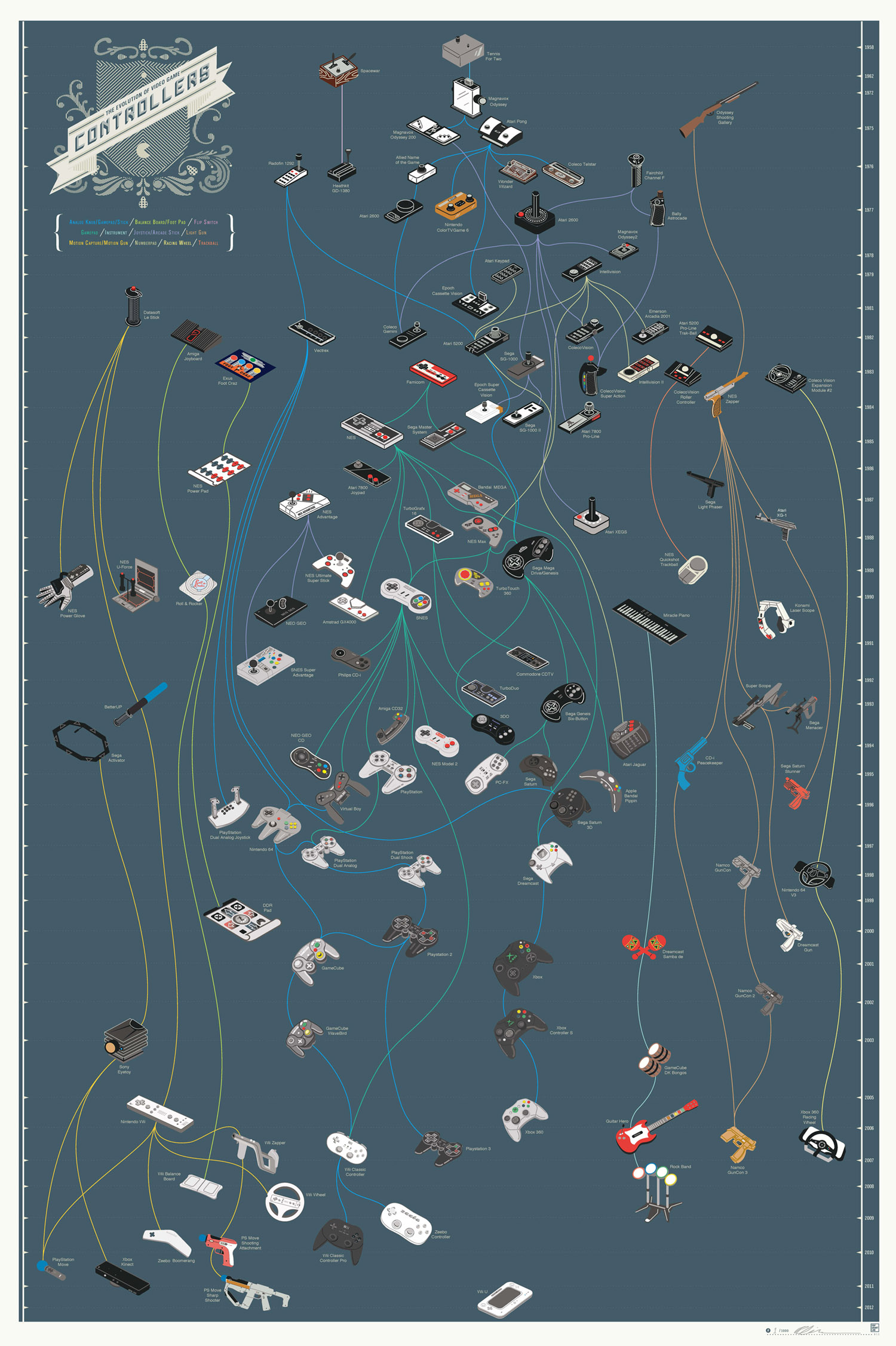
    The History of Video Game Controllers

    http://images.fastcompany.com/upload/Controllers2011-Full.jpg

    Wednesday, September 14, 2011

    LG SmartScan Mouse

    Pretty cool. LG SmartScan mouse. Use it as a mouse. Use it as a scanner (for any document up to A3-size; 300dpi). It even does OCR. Save as PNG, BMP, JPEG, TIFF, PDF, XLS, or DOC. It runs for about $199.

    This would be good for laptops.  Sure, you can take a picture using a cell phone, but then you have to send it to your email, log into your web email account, and download the photo.  And you do this with a document, it's a photo, not an OCR document.

    So .... if you have a laptop and can see yourself scanning stuff, this may be a viable option.  And ... you can still use it as a mouse.
    http://www.techradar.com/news/computing-components/peripherals/hands-on-lg-lsm-100-smartscan-mouse-review-1016097

    Monday, August 1, 2011

    Have Onstar? Will Hack

     At this year's White Hat convention, someone hacked an OnStar car using a cell phone and sending text messages.  The person was able to unlock the doors and start the car.

    Now, as bad as this sounds (and it's pretty bad) the same type of technology is used for things like smart grids.

    http://gizmodo.com/5825832/hackers-can-unlock-doors-start-some-cars-via-sms

    Paper on Hacking the Smart Grid (PDF)